
Media2URL

Audio to Link Converter for MP3 and WAV Recordings

Turn audio into a link for a compatible player by uploading an MP3 or WAV. Share the page when someone should listen in a browser.

Upload audio

Drag and drop files or paste from your clipboard

MP3 and WAV

AUDIO RESULT

Listen before you send the link

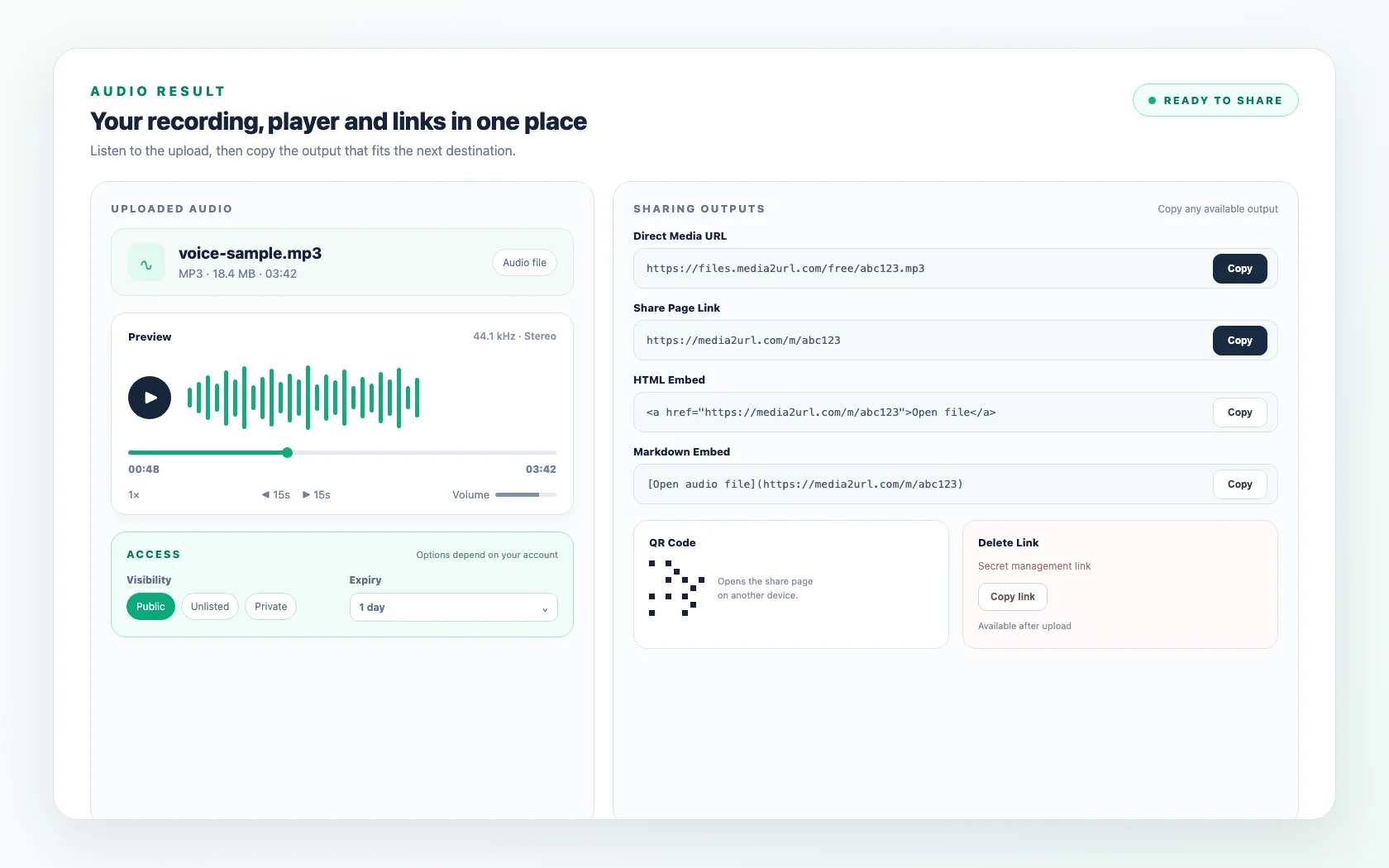
After the upload, the first useful check is the recording itself. The result keeps the browser player beside the available links, so you can listen before copying anything and catch the wrong take or an accidental upload while it is still in front of you.

Once the recording sounds right, the same result has what you need for the handoff. The share page works for someone who simply wants to listen in a browser, while the file URL is there for a compatible player that needs the hosted recording.

Media2URL Audio to Link Converter showing an audio player, waveform, direct audio URL and share page
Example of an audio upload result. The available upload size, sharing options and access settings depend on your Media2URL plan.

LISTENING OR FILE ACCESS

For a listener or another player?

The same upload can lead to different destinations. A person reviewing a voice sample usually needs something simple to open and play, while another website or application may ask for the audio file address itself.

The share page handles the first situation by giving the listener a normal browser player. The direct audio URL handles the second because it points to the hosted recording rather than a Media2URL viewing page.

If you are unsure which type of link belongs in another website or tool, read the Direct Links guide.

Does someone mainly need to listen?

Share Page

Browser player

Does another website need the audio source?

Direct Audio URL

Audio source

https://media2url.com/demo/audio

Should another device open it?

QR Code where supported

Opens the share page from another device.

Should the review stop later?

Expiry or available access controls

PublicExpiry where availableAccount controls

RECORDINGS IN PRACTICE

Voice samples, clips and website audio

A voice sample, website audio file or review recording may all begin with the same upload, but the useful link depends on what happens afterwards. Looking at the recording itself makes that decision easier than treating every audio file as the same sharing job.

CLIENT REVIEW

voice-sample.mp3MP3 · 01:48

A voice sample can become awkward to resend as another attachment whenever a client wants to hear it. Upload the recording and send the share page when the listener mainly needs to open it in a browser and respond with feedback.

Recommended output

Share Page

Status

Browser player

WEBSITE AUDIO

product-intro.mp3MP3 · 00:32

A website or application may ask for the audio source rather than a page around the recording. Use the file URL in that situation, then test it in the same player where the sound will actually appear. If the recording will remain on your website for a long time, check the expiry setting before using the link. Once the link expires, the website's audio player will no longer be able to load the recording from that address.

https://media2url.com/demo/audio

Recommended output

Direct Audio URL

Status

Source field

INTERVIEW MASTER

interview-clip.wavWAV · 02:16

A WAV recording may already be prepared exactly as the next workflow needs it. The normal Audio to Link upload keeps the supported file you provide rather than automatically converting it into MP3.

Recommended output

Share Page or File URL

Status

Original format preserved

TEMPORARY REVIEW

review-recording.mp3MP3 · 06:12

A draft recording may only need to remain available during a short review. Where your account provides expiry or restricted access controls, choose those settings before sending the audio link so the sharing period matches the job.

Recommended output

Share Page

Status

Expiry where available

PLAYER COMPATIBILITY

Check the player that will use the URL

A direct audio URL gives the receiving website or player access to the hosted recording, but playback still depends on the format, encoding and destination. Test the link in the actual player before sharing it. If the recording needs trimming or conversion first, finish that work in Audio Studio before creating the final link.

FILE

voice-sample.mp3

FORMAT

MP3

PLAYER

Browser or application

RESULT

Playback depends on supported format and encoding

KEEP THE FORMAT YOU UPLOADED

Keep the uploaded MP3 or WAV

Audio to Link accepts MP3 and WAV files and hosts the supported recording you provide rather than converting it into another format. M4A and OGG are not currently accepted here. If the recording needs trimming, compression or conversion before sharing, prepare it in Audio Studio first.

FileFormatDurationWaveform
voice-sample.mp3MP303:42
interview-master.wavWAV02:16

LISTEN BEFORE YOU SHARE

Review what the recording contains

Audio can capture information that is easy to overlook while recording. A voice sample or interview may include somebody's name, a private conversation in the background or a few extra seconds that were never meant for the recipient.

Listen to the final file before creating a public audio link. When the recording is only meant for one client or a short review, choose the visibility and expiry settings available for your account instead of leaving it open longer than necessary.

Recording reviewListen before sharing
00:00Intro
00:18Main recording
01:34CHECK THIS PART
Background conversation
01:48End
review-recording.mp3Review copy

Visibility

Private where supported

Expiry

7 days where supported

Password

Available where supported

AUDIO TO URL TOOL

A voice sample, interview or finished recording can be sent as a link while the uploaded MP3 or WAV stays in its original format. Listen to the result before sending it, especially when several takes have similar filenames.

Upload audio

Example output · placeholder values

Direct audio URL

https://media2url.com/demo/audio

Share page

https://media2url.com/demo/audio/share

HTML player

<audio controls src="https://media2url.com/demo/audio"></audio>

These placeholder addresses use Media2URL's /demo/ path and have no file extension. Upload an MP3 or WAV to create a real audio URL and share page.

REAL AUDIO UPLOAD

An MP3 upload, before and after

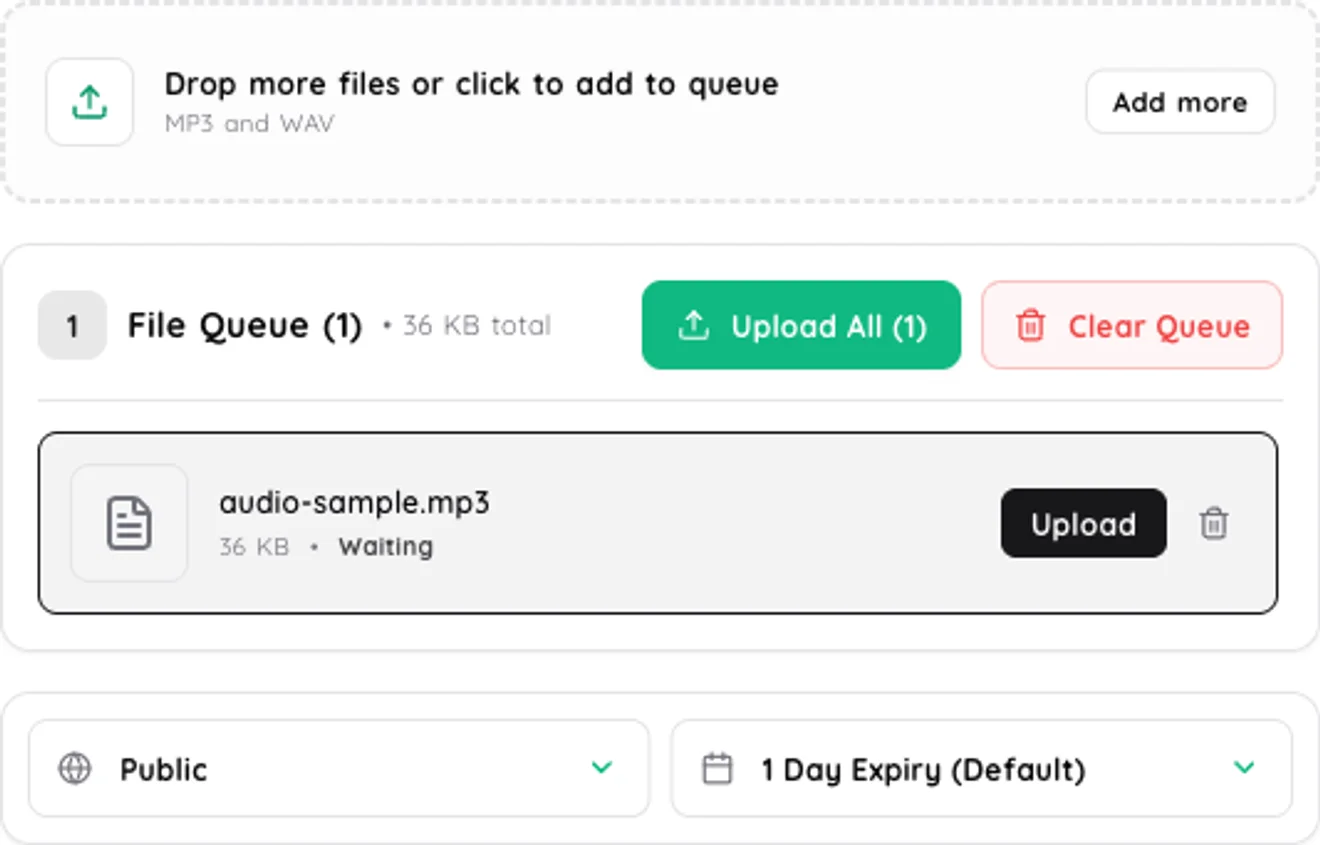
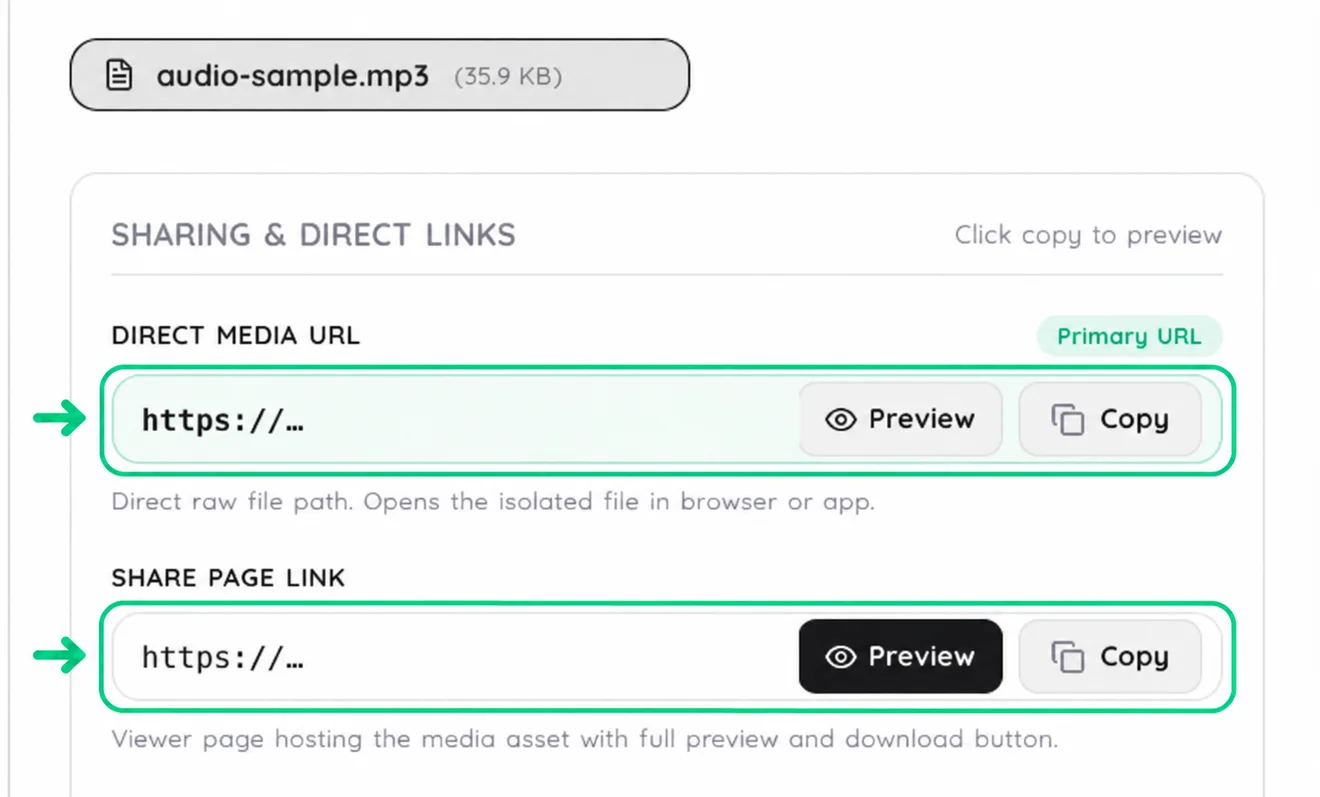
Set the recording’s visibility and expiry while the MP3 is still in the queue. After upload, preview it and choose between the direct URL and the share page.

Before upload

Audio to Link upload queue showing an MP3 waiting to upload, with Public visibility and expiry after one day selected

After upload

Completed Audio to Link upload with the Direct Media URL and Share Page Link controls highlighted

FROM RECORDING TO LISTENER

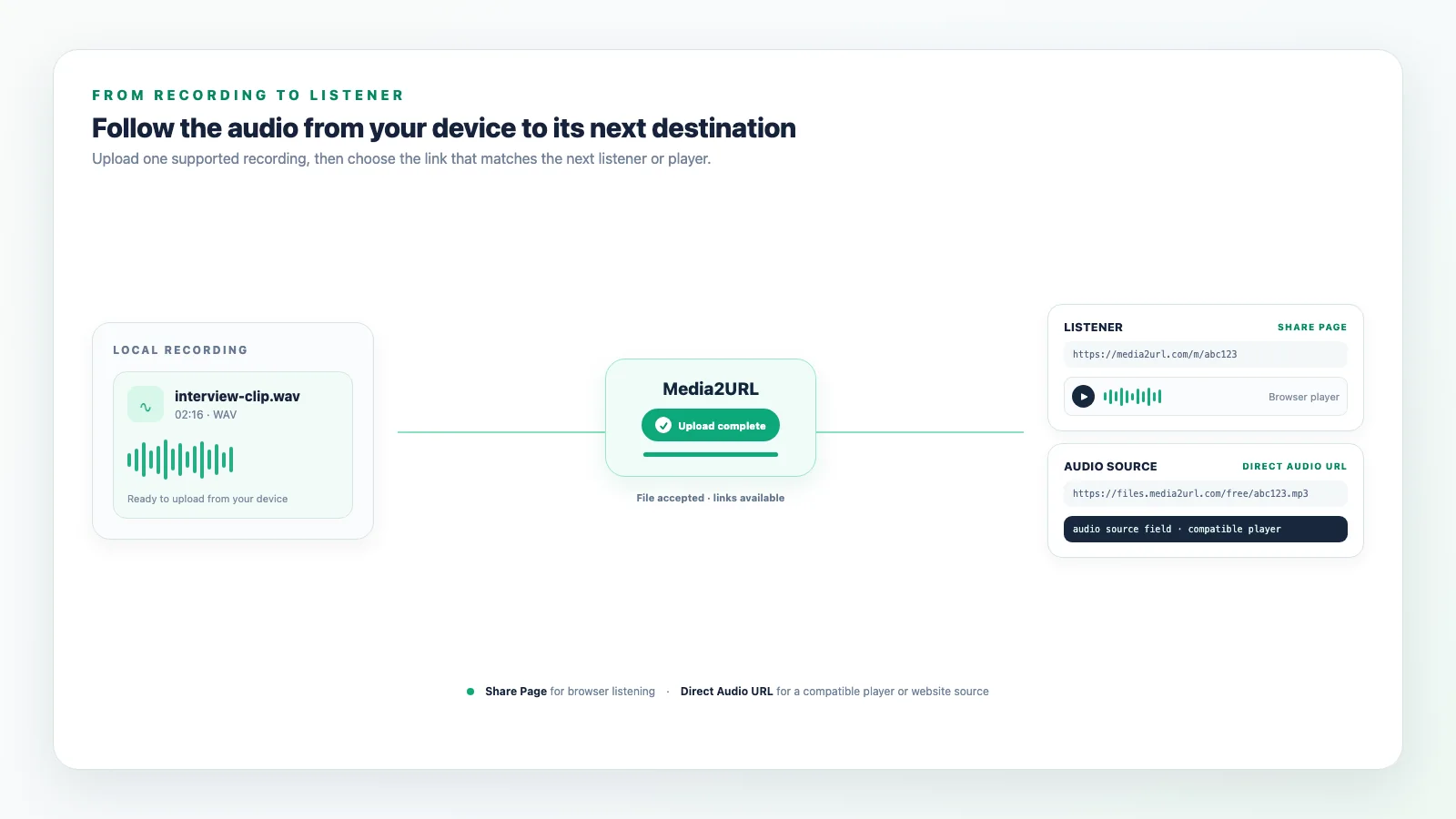
From your device to the listener

Upload the recording from your device, then review the result before sharing it.

Audio to URL workflow showing a recording uploaded to Media2URL and delivered through a browser player or direct audio URL

AUDIO LINK QUESTIONS

Audio sharing questions

Which audio formats can I upload?

The audio uploader accepts MP3 and WAV files that pass the file and account checks. M4A and OGG are not currently accepted by this uploader. The available file size depends on the limits for your account.

How do I turn audio into a link?

Upload a finished MP3 or WAV recording. After Media2URL hosts it, the result gives the recording an online address. Copy the share page for normal listening, or use the audio file URL when another player asks for the recording source.

Can I create a link for a WAV file?

Yes. WAV is an accepted audio upload format. Upload the file and use the share page or file URL shown when processing finishes. The uploader hosts the WAV file; it does not convert it to MP3.

Does the recipient get an audio player?

The share page can show a browser audio player when the listener's browser supports the uploaded format and encoding. This makes the share page useful when someone needs to hear the recording without working directly with the raw audio URL.

When should I use the direct audio URL?

Use the file URL when a website, compatible player or another application needs the hosted audio file itself. Use the share page when you are sending the recording to someone who should open it and listen inside a normal browser page.

Can I restrict audio access or make the link expire?

The uploader shows the visibility and expiry options available for your account. Private audio links, password protection and additional download controls can depend on your selected plan.

Need another kind of link? Use Video to URL tool for supported video playback, or File to URL tool for other supported documents and downloadable files.